Steam Deck Buying Guide: Storage Tiers, Screen Options, and What You Need
A practical guide to choosing a Steam Deck configuration, including how much storage you actually need and what to expect from PC gaming on a handheld.
A practical guide to choosing a Steam Deck configuration, including how much storage you actually need and what to expect from PC gaming on a handheld.
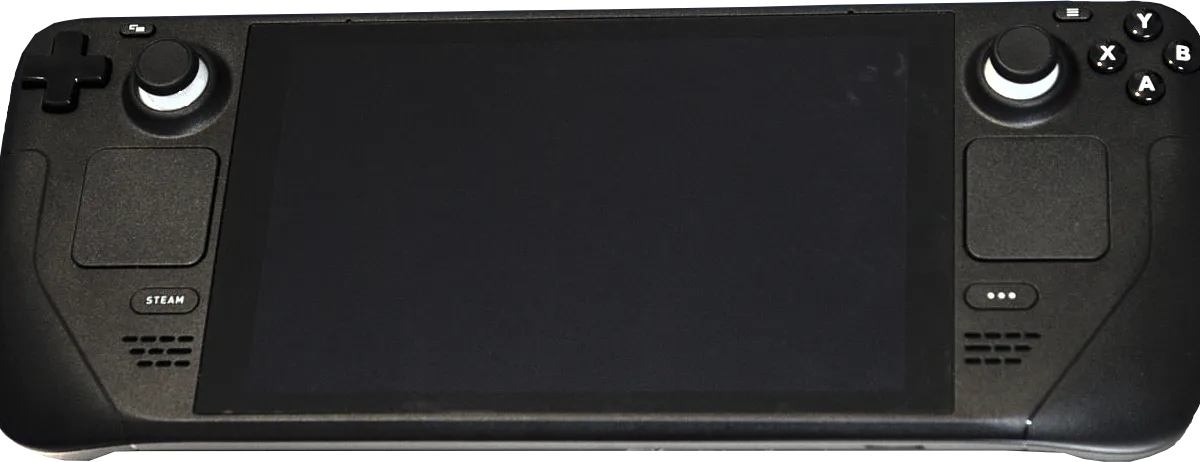
Photo by Liam Dawe/GamingOnLinux, PNG version by VulcanSphere / Wikimedia Commons / CC BY-SA 4.0
Steam Deck occupies a different space than a traditional console handheld — it’s essentially a PC built into a gamepad-shaped body, running Valve’s own Linux-based operating system. That distinction shapes almost every buying decision around it.
What the Steam Deck Actually Is
Because Steam Deck runs a full PC operating system under the hood, it can run your existing Steam library directly rather than requiring separately purchased console versions of games. It’s designed to run most of that library well, though compatibility and performance vary title by title, since not every PC game is optimized for a handheld’s controls or lower power envelope. Before buying, it’s worth checking Steam’s own per-game compatibility ratings for titles you specifically care about, since some games run great out of the box and others need extra configuration or don’t run well at all.
Storage Tiers Explained
Steam Deck has historically been offered in multiple storage tiers, generally differentiated by both capacity and the speed of the storage itself. Faster storage tiers can noticeably reduce loading times in some games, on top of just holding more installed titles. Because PC game libraries tend to include a wide range of file sizes — some very small, some very large — think about how many games you want installed simultaneously, not just your total library size, since you can always reinstall a game you’ve temporarily removed.
A microSD card slot lets you expand storage after purchase, which is a reasonable way to offset choosing a smaller internal storage tier at checkout, though internal storage is typically faster than a microSD card for load-time-sensitive games.
Screen and Model Differences
Across Steam Deck’s lifecycle, Valve has offered models with different screen technologies, and screen quality affects more than just visuals — a higher-quality panel typically means better color accuracy, contrast, and sometimes a higher refresh rate, all of which matter more if you play a lot of visually rich single-player games versus fast, simple titles where screen quality matters less. Battery life, weight, and thermal behavior can also vary somewhat between model revisions, so it’s worth comparing current official specifications rather than assuming all Steam Deck models are identical.
Do You Need Extra Accessories Right Away
A carrying case is worth buying immediately, since the handheld’s exposed sticks and buttons are more vulnerable to bag damage than a console you keep stationary. A microSD card is close to essential unless you bought the largest internal storage tier and don’t plan to install much. Beyond those two, most other accessories — docks, extra chargers, controller grips — are worth waiting on until you know your actual usage pattern.
Bottom Line
Buy based on how many games you want installed at once and how much you value display quality versus a lower price, since those are the two axes that most differentiate Steam Deck configurations. A case and a microSD card cover the essential day-one needs for almost every buyer; everything else can wait.
Our picks: Steam Deck accessories
Shop on Amazon
Affiliate links.As an Amazon Associate I earn from qualifying purchases. Links below go to Amazon; prices and availability change, so check Amazon for current pricing.Affiliate disclosure

Illustrative photos: Photo by Liam Dawe/GamingOnLinux, PNG version by VulcanSphere / Wikimedia Commons / CC BY-SA 4.0; Photo by Evan-Amos / Wikimedia Commons / Public domain